Author Archives: Alan Coates

Sitecore client and logon is very slow (properties table AGAIN)

The problem

I was at a customer to help identify why their Sitecore 7.2 client and logon was so slow!

Investigation

There are a number of things I look at when the Sitecore client starts to run slowly:

  1. Slow Event handlers (save, rename, create, etc)
  2. Slow pipeline processors (usually don’t check that it is a sitecore specific requests)
  3. History, Publish queue or Event queue have to many entries, see my blog on how to fix this.
  4. Property change events flooding the Event Queue in the Core database, see my blog on how to fix this

But after ensuring all the previous issues were not the problem, I found a new issue with the properties table.

Properties Table flooded with SC_Ticket entries

The properties table in the core database had over 500000 entries, it was filled with SC_TICKET_xxx entries.

tickets

Unfortunately the properties table does not have a created date column, so I could not write an SQL script to purge all the entries that where more than X days old.

I noticed that in the value column there was a time-stamp embedded in the Value field. My initial solution was to could create an sitecore agent to do the following:

  1. iterate over all the entries in the properties table
  2. Parse the value for SC_Ticket entries
  3. Remove all the entries that were older than X days.

I knew Sitecore must have a class, which had created all these entries. So using DotPeek I started my search and found the TicketManager class. The TicketManager even had a IsTicketExpired function.

is expired function

Solution

I found that there is already a Sitecore agent that checks for any tickets that are expired and removes them. It is called the CleanupAuthenticationTicketsAgent for some reason this was not in the web.config, but it is easy enough to add see below.

agent

But the important step is to reduce the number of days to keep the tickets as the default is 180. The Authentication.ClientPersistentLoginDuration setting is responsible for determining how long before the ticket should expire (see the IsTicketExpired function in the image above).

I set Authentication.ClientPersistentLoginDuration to 5 and it reduced the number of entries in the properties table to around 500, and then sitecore client and logon was much faster.

Prior to writing this post I wasn’t aware but the is a blog about how sitecore sessions can expire.

Sitecore 9.0.1 & 9.0.2

There is a bug which causes the scheduled job to not work at all, it is fixed in this support case https://github.com/SitecoreSupport/Sitecore.Support.223702

Un-tangling Sitecore configuration includes

I recently worked on a project that used SlowCheetah (XML Transforms) and Octopus variable substitution to modify the custom Sitecore include files.

It proved difficult to determine what the Sitecore configuration was in each environment, especially for the content delivery servers, as it was not possible to call showconfig.aspx.

Solution

Each time the application starts, it writes out the contents of the merged Sitecore configuration to a file in the logs folder. The file name contains the instance name, date and time created. So in addition to seeing the current configuration, you can also see how it changes over time (very useful after a deploy where nothing works).

Get the merged Sitecore configuration

It turned out to be very simple to implement, as it only takes one line of code to get the merged Sitecore configuration:

XmlDocument xmlDocument = Sitecore.Configuration.Factory.GetConfiguration();

Create a custom pipeline processor class

Create a processor for the initialize pipeline, so each time Sitecore is started the processor will be called to ensure that the configuration is saved. Create a public class with a public member called Process, which accepts a parameter of type PipelineArgs. The code below is all that is needed.

namespace Exmaple
{
  public class SaveSitecoreConfiguration
    {
        public void Process(PipelineArgs args)
        {
            string fullPath=string.Empty;
            try
            {
                XmlDocument configuration = Factory.GetConfiguration();
                string filename = string.Format("SitecoreConfiguration.{0}.{1}.xml", DateTime.Now.ToString("yyyyMMdd-hhmm"), Sitecore.Configuration.Settings.InstanceName);
                string logFolder = Sitecore.Configuration.Settings.LogFolder;

                // Is it a relative or virtual folder ?? could be a configured to point at an physical directory
                if (!Directory.Exists(logFolder))
                {
                    logFolder = HttpContext.Current.Server.MapPath(logFolder);
                }
                

                fullPath = Path.Combine(logFolder, filename);
                configuration.Save(fullPath);

            }
            catch (System.NotSupportedException supportedException)
            {
                Sitecore.Diagnostics.Log.Error(string.Format("Error saving sitecore configuration, path:{0}", fullPath), supportedException, this);
            }
            catch (Exception exception)
            {
                Sitecore.Diagnostics.Log.Error("Error saving sitecore configuration", exception, this);
            }
        }

    }
}

Configuration Changes

The processor has to be added to the initialize pipeline, I would recommend you create an include file to achieve this, but for the sake of clarity I have added it directly to the web.config, see below.

example

Now every-time Sitecore is started it writes out the configuration, so it is easy to get the configuration and monitor how it changes for all environments over time.

I hope this helps you untangle the Sitecore includes which at times can be a nightmare.

Sitecore Commerce 8 powered by Microsoft Dynamics (SCpbMD) – No catalog data

In this blog post, I am going to share some SQL statements that will help save your sanity whilst working with Microsoft Ax integration.

Problem

The Customer and their Microsoft Ax partner assured me that the catalog data was published correctly to the channel database. Unfortunately, when the “Routing Service” was run – no data was imported into Sitecore Commerce Server and no error or exceptions were thrown. The import XML files where created correctly, just with no catalog content.

A big thanks to Sitecore (Canada) as we investigated the issue together, and they supplied a number of SQL statements, which reviled the truth.

Solution

Lets jump straight to the SQL statement that saved my sanity. Firstly you need the channel id for the SQL statements, see my previous blog post about how to get this.

The following SQL statement returns relevant catalog information for a given channel id.

exec sp_executesql N'SELECT         
                    getCatalogsFn.[CATALOG],
                    getCatalogsFn.[NAME],
                    getCatalogsFn.[DESCRIPTION],
                    getCatalogsFn.[IMAGE],
                    getCatalogsFn.[LANGUAGE],
                    getCatalogsFn.[ENABLESNAPSHOT],
                    getCatalogsFn.[VALIDFROM],
                    getCatalogsFn.[VALIDTO],
                    getCatalogsFn.[CREATEDDATETIME],
                    getCatalogsFn.[MODIFIEDDATETIME],
                    getCatalogsFn.[PUBLISHEDDATETIME]
                FROM crt.GETCATALOGSPUBLISHEDTOACTIVECHANNEL(@bi_ChannelId) getCatalogsFn',N'@dt_ChannelDate datetime,@bi_ChannelId bigint',@dt_ChannelDate='2015-10-14 00:00:00',@bi_ChannelId=[YOUR CHANNEL ID]

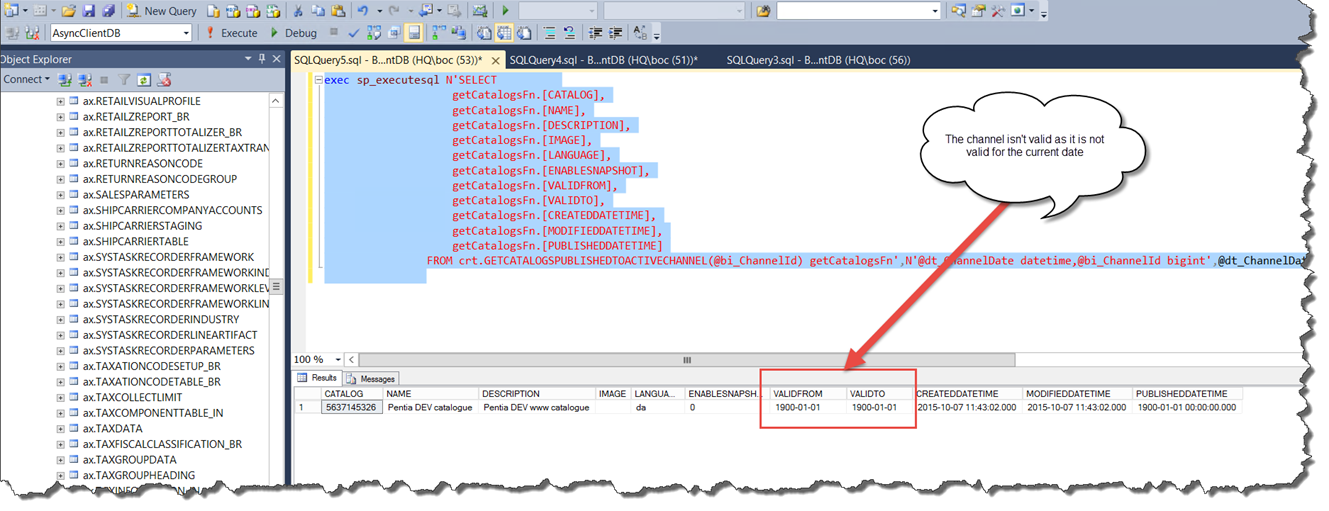
In my case when I ran the SQL statement above I found 2 issues. The first is that the catalog was not valid for the current date (see the image  below). Something was not setup correctly within Microsoft Ax as the valid from and to date were set to the .net minimum value 😦

date valid

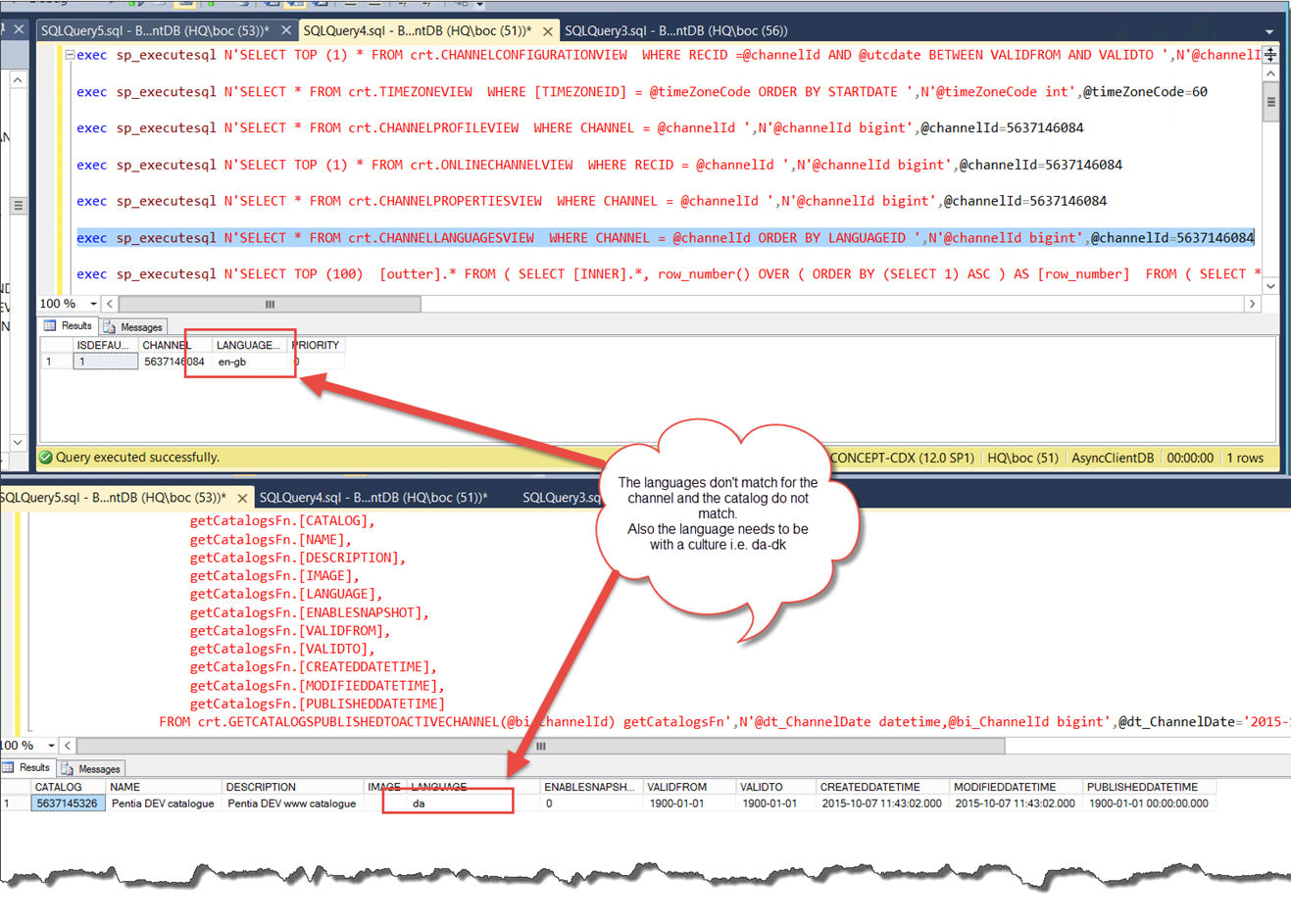
The second issue was that the languages did not match. The channel language is “en-gb”, but the catalog language is “da”! Take a look at the image below.

In addition the language needs to be a fully qualified with culture so da should be da-dk.

language mis match

SQL statement to get the channel language

Another common error a mismatch in the channel/catalog languages, use the following SQL statement to find the channel language.

exec sp_executesql N'SELECT * 
   FROM crt.CHANNELLANGUAGESVIEW  
   WHERE CHANNEL = @channelId ORDER BY LANGUAGEID ',N'@channelId bigint',@channelId=[YOUR CHANNEL ID]

Well I hope this will be of some help, Alan

Sitecore Commerce 8 powered by Microsoft Dynamics (SCpbMD) – Find the channel ID

Sitecore expects an integer value to identify the channel id, which is used to identify the online store to retrieve from the channel database.

The problem I faced was that the neither the Microsoft Ax Partner or the customer could give me the id, all they could find was the name which was a string value!

But fear not the following SQL statement which you can run against the channel database will show you all the channels and their assoicated id 🙂

SELECT TOP 1000 [NAME]
      ,[CHANNELID]
      ,[OPERATINGUNITNUMBER]
      ,[SERVER]
      ,[DATABASE]
      ,[ISPUBLISHED]
      ,[ISLOCAL]
      ,[CONNECTIONSTRING]
  FROM [AsyncClientDB].[crt].[STORAGELOOKUPVIEW]

Also ensure that channel is in fact published otherwise Sitecore can not use it, hope this helps Alan

channel id

Sitecore Commerce 8 powered by Microsoft Dynamics (SCpbMD) – Cannot change the publishing status of the channel

Well I have been having a lot of fun setting up Sitecore Commerce 8 powered by Microsoft Dynamics; there are a lot of moving parts to get get the catalog data from Ax, all the way into Sitecore. Not to get political but in fact 90% of the issue have come from Microsoft Ax not being setup correctly.

Routing Service

The Routing Service is responsible for transferring the catalog data from the Channel Database into Sitecore Commerce Server which acts as an edge server for Sitecore. In addition the routing service needs to access the Microsoft Ax Real Time Service (RTS) to change the publishing status.

But why does Sitecore need to update the publishing status anyway? I would assume that was the responsibility Microsoft Ax?

The Sitecore Routing Service is considered part of AX channel publish step. The Routing Service needs to ensure all publishes from HQ to channel database is finished. For a more detailed answer see this article from Microsoft, where the “Routing Service” is equivalent to the SharePoint in the diagram.

I found the following articles by Hao Liu, very useful in tracking down errors and issues with the catalog synchronization.

Communication with Ax is a black box

When communicating with Microsoft Ax it is completely transparent. You call the Microsoft run time DLL’s which connect to the channel database; which resolves how to communicate with the RTS, get the catalog data, create shopping baskets, talk to HQ’s Ax to create orders etc.
Which is great until it does not work as determining where it has gone wrong is a nightmare.
I did not have access to the Microsoft Ax setup and we got  the following exception.

Exception while calling invoke method UpdateChannelPublishingStatus: An unsecured or incorrectly secured fault was received from the other party. See the inner FaultException for the fault code and detail.

Any of the following reasons can cause the a fore mentioned error

  1. You have to use SSL to communicate with the RTS web services
  2. The RTS web service is not running at all.
  3. The RTS web service is not running SSL (which it must)
  4. The RTS web service “host name” does not match the name of the SSL certificate.
  5. The host name running the RTS Web service does not match the host defined in Microsoft Ax.
  6. The credentials running the RTS web service are not correct, and do not have access to the HQ Ax.

Cannot change the publishing status of the channel (record Id: 5637146084) to ‘Failed’.

Then we got the following exception and we (Sitecore Support, The Microsoft Ax Partner & myself) spent a lot of time trying to identify what was causing the following exception:

Cannot change the publishing status of the channel (record Id: 5637146084) to ‘Failed’.
at Microsoft.Dynamics.Commerce.Runtime.TransactionService.TransactionServiceClient.GetResponseFromMethod(String methodName, Object[] parameterList, Boolean useExtensionMethod) at Microsoft.Dynamics.Commerce.Runtime.TransactionService.TransactionServiceClient.UpdateChannelPublishingStatus(Int64 channelId, OnlineChannelPublishStatusType publishingStatus, String publishingStatusMessage)

Solution

I am not sure if it was sheer desperation, divine intervention, or more likely luck!!!

But I checked the SQL server which hosted the channel database, and it had no disk left.

For some reason (I did not install the async client and or the channel database) the recovery mode was set to “Full” and it had therefore create 1 TB of log file 😦

I set the recovery mode to “Simple”, ran shrink on the database and the size dropped from 1TB to almost nothing, and the exception was gone 🙂

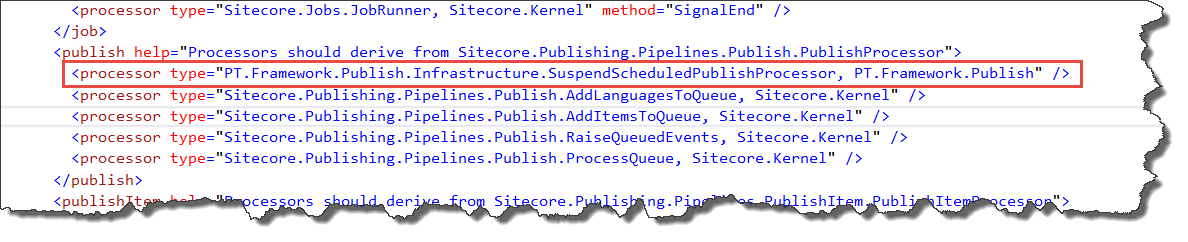
How to suspend sitecore schedule publishing – aborting the publish pipeline is not enough, it requires an exception!

The customer wanted the ability to suspend scheduled publishing, but could still make manual publishes (i.e. started from the Sitecore client).

Each time a publish is started it runs the publish pipeline. Therefore it is possible to insert a custom pipeline step at the beginning (see below) to do the following:

  1. Identify if it was a scheduled publish
  2. Check if a check-box in Sitecore is ticked
  3. If both conditions are met – abort the publish pipeline to stop the publish

publish pipeline

Unfortunately aborting the publish pipeline is not enough 😦

In the initial code I would abort the pipeline using AbortPipeline() (see below) as I assumed this was enough to stop the publish. The pipeline was aborted and no items were published, but the code that starts the pipeline still updated the properties table indicating that the publish had succeeded:-(

code

Side affect

This had the side effect that when the schedule publishing was enabled again, any items that were modified or created whist the publishing was disabled would not be published as when scheduled publishing was resumed Sitecore believed that they had already been published.

Solution

After checking the code using reflector I determined if I threw an exception, it would ensure that the properties table was not updated. So the publish was completely cancelled, and when scheduled incremental publishing was resumed it will publish all the items that have been modified since the last successful publish, and not since the last aborted publish.

How to identify a scheduled publish

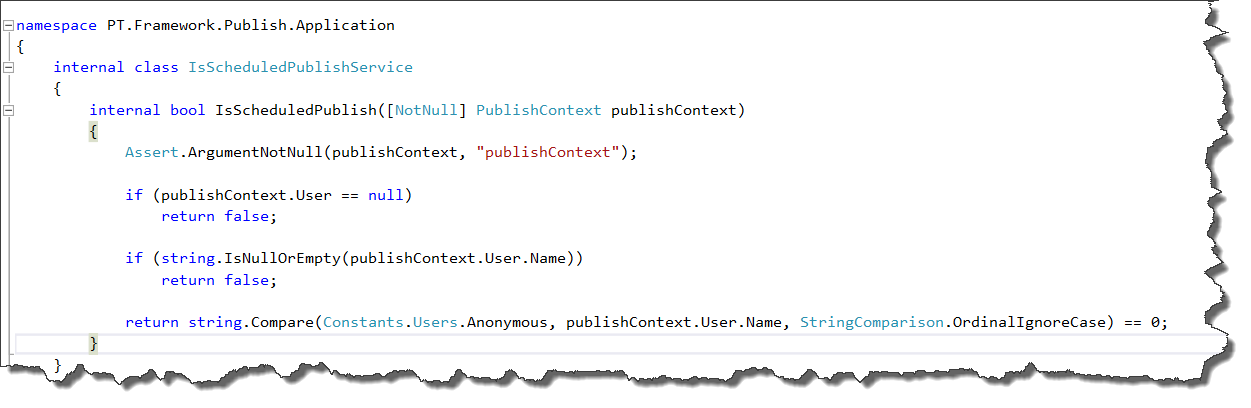
Not the nicest solution but it works! I check the publish context user which can have the following values:

  1. The user logged into sitecore – If publish is started from the Sitecore client
  2. sitecore\Anonymous – if the publish is started by the scheduler

If the value is sitecore\Anonymous I know that it is a scheduled publish.

is schedules


How to filter AD roles or users using Sitecore’s LDAP module

Problem
Every time I have used AD for providing access to Sitecore, the active directory (AD) structure is crazy and recently I had a customer that had over 18000 roles, which made it difficult to assign roles and it killed the performance of the Sitecore client, as each user had at least 500 roles. Therefore Sitecore to evaluate the combination of a lot of roles to determine if they had read access or not.
18000I talked to the department responsible for the AD setup about changing and or creating a folder that only contained the Sitecore related roles, but this was not possible.

Initially I thought I would have to make own LDAP provider which derives from the standard provider, but I discovered this was not necessary as the LDAP module provides the functionality as standard.

Custom Filters
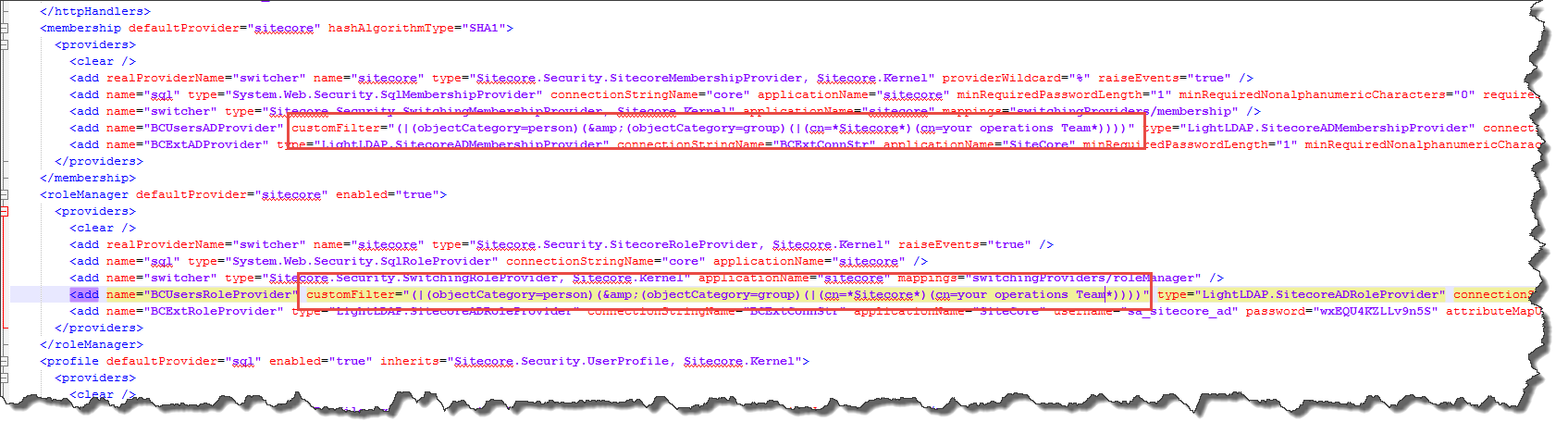
Custom Filter provide the ability to filter the roles and or users returned from the AD (see section 4.1 for full documentation).The custom filter uses the standard LDAP query syntax (see MSDN) to specify how the user or roles are filtered.

The following example ensures only roles, which contain Sitecore and or the special operations role; are imported into Sitecore. The Customcustom Filter

According to Sitecore documentation, both the User and Role provider must have the same CustomFilter, and that is why the (objectCategory=person) is added so all users are also imported regardless of their name.

I hope this blog post will help others using LDAP to control what roles or users are shown within sitecore.

Sitecore – RebuildSearchIndex|System.FormatException: Unrecognized Guid format.

After upgrading from 7.5.141003 to 7.5.150130, when I tried to rebuild the search index or the Link database I got the System.FormatException: Unrecognized Guid format after sometime!

Uli (@UliWeltersbach) had already written a great blog post about this exception and how to find the items causing the issue and how to fix the issue.

I would recommend you read Uli’s blog, but here is the quick version – The exception is caused by an error in the _tracking field used by the Analytic’s engine, which is very strange as the website has disabled the Analytic’s, see below?

disabled

Analytics is disabled, so why when I try to save the item to I get the following exception???

cant save

As I am not a very trusting person, I swapped to using raw values in the content editor and I could see that there was in fact data in the __tracking field!

raw

Cause

Initially the website did have analytics enabled I guess, but as some point it was disabled. The site was upgraded from 6.4 to 7.5 and somewhere along the line one or more of the update packages form sitecore did not update the __tracking field as analytics was disabled.

Therefore the old contents in the __tracking file were not in the correct format and caused the exception.

Solution

In my case deleting the contents was enough to fix the issue.

Another approach is to enable analytics edit the tracking field and save again, and it is converted to the correct format.

Sitecore History Table – how to control how long the entries are kept?

The following tables can contain a lot of data, especially if the website creates and or edits a lot of items, for the first 2 the tables it is very simple to define how many days to keep the data.

  • Publish Queue
  • Event Table
  • History Table

If there is to much data in any of the table it can causes the performance issues for Sitecore. By default Sitecore stores data for 30 days, which is too long.

Sitecore uses the following scheduled task to clean the database tables.

  1. Sitecore.Tasks.CleanupPublishQueue
  2. Sitecore.Tasks.CleanupEventQueue
  3. Sitecore.Tasks.CleanupHistory

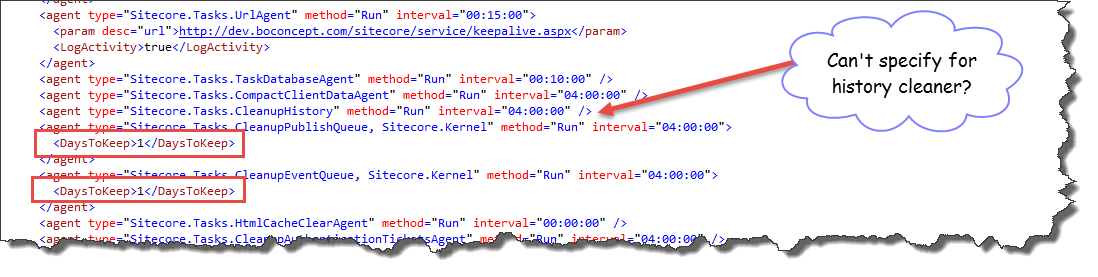
Both CleanupPublishQueueCleanupEventQueue tasks provide the ability to specify the number of days to keep the entries (see below). Unfortunately in some cases 1 day is too long, but I will get back to that in another post.

days to keep

So why can’t you specify the number of days for the Sitecore.Tasks.CleanupHistory?

Just in case it was another undocumented feature, I opened up reflector and took a look at the Sitecore.Tasks.CleanupHistory implementation to see if it was possible or not to specify the period of time to keep entries in the history table – It wasn’t!

I continued my search and found that the SqlServerHistoryStorage.Cleanup() function (see image below) is responsible for cleaning the history table. The SQL statement uses the EntryLifeTime property to define the threshold (time-span) to keep the entries.

clean up function


Solution

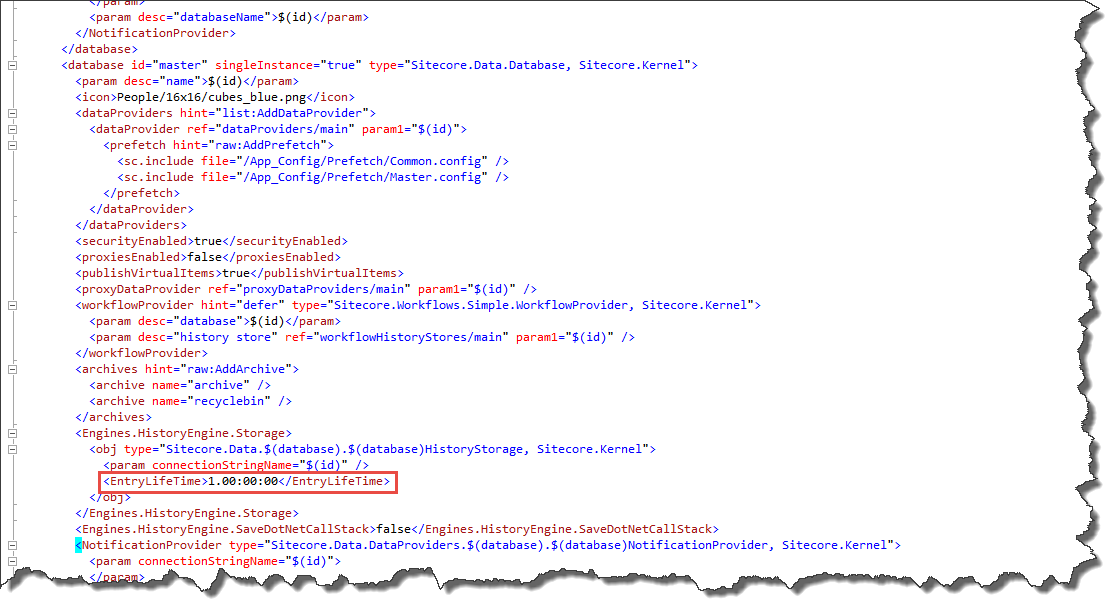
With a bit more investigation I found that it was possible to define the EntryLifeTime value for each database in the web.config. It is possible to define the time-span using days, house, minutes s and even seconds 🙂

timespan


Hope this helps, Alan

Sitecore – property change events flooding the Event Queue in the Core database

I had an issue that the EventQueue table in the Core database which was being flooded with events, which in turn was responsible for causing bad performance.

This was caused by the fact that each time the Lucene indexes are updated Sitecore raises the database:propertychanged event.

event queue core datbase


The default implementation subscribes to the event and adds it to the EventQueue table in the core database. I set the “Days To Keep” events to 1 day – but it still inserts over 100000 events a day 😦

Sitecore have registered this as a bug, but as yet there is no fix for 7.5 or 8.

Solution

This is not very nice at all, but  it was the best we could do as a workaround for this issue. The credit for this solution must go to my colleague Peter Wind (@peterwind) who is created the hack!

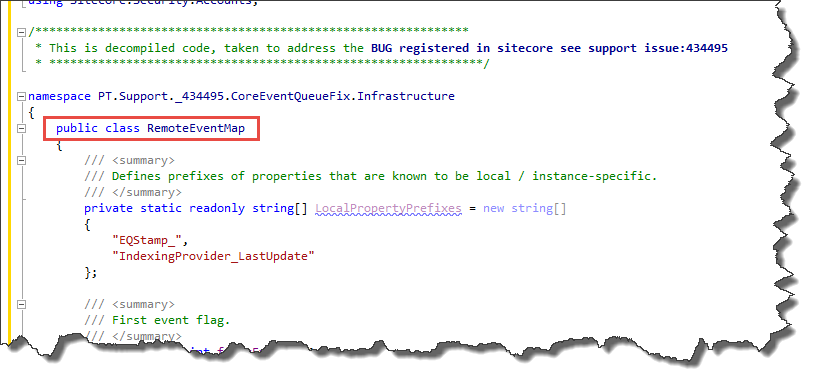
Use reflector to get the code for the default Sitecore.Eventing.Remote.RemoteEventMap class (defined in Sitecore.Kernel.dll), and create your own class, see below.

own class

Modify the SetupGlobalEventSubscribers function, so you subscribe to the database:propertychanged event – but do not add the event to the EventQueue, see below.

code change

The last step is to update the configuration in the web.config to use your new and improved class.

config

note: I have the support case number in the namespace & DLL name – so when the bug is fixed, I can remove this code and in addition any other developer at Pentia can see the history related to this support issue and why I have done such a nasty fix.

Anyway I hope this helps somebody out there 🙂