Sitecore SPEAK Insert Link Dialog – missing icons & sitecore tree – Don’t panic, U didn’t break it!!!!

I was upgrading a solution from 6.2 to 7.2 and it had a number of custom fields that no longer worked,  so I started to fix the code.

One of the custom fields showed the SPEAK  Insert link dialog and after making a lot of changes, I noticed that I had broken the SPEAK dialog, see below

Speak dialog....

I reviewed the changes I had made, and could not see what could have caused this issue? But to be on the safe side, I undid all of my changes, did a full build, etc and still I had the issue 😦

So I tried to open the dialog from a sitecore standard field, and it was also broken 😦

Solution

Whist starting to panic, after 5 minutes I noticed that the dialog had fixed itself!!!!

It appears that after a restart of the website the first time you open the “Insert link” dialog you have to wait 5 minutes for it to start working, after that it works straight away.


C# Regions

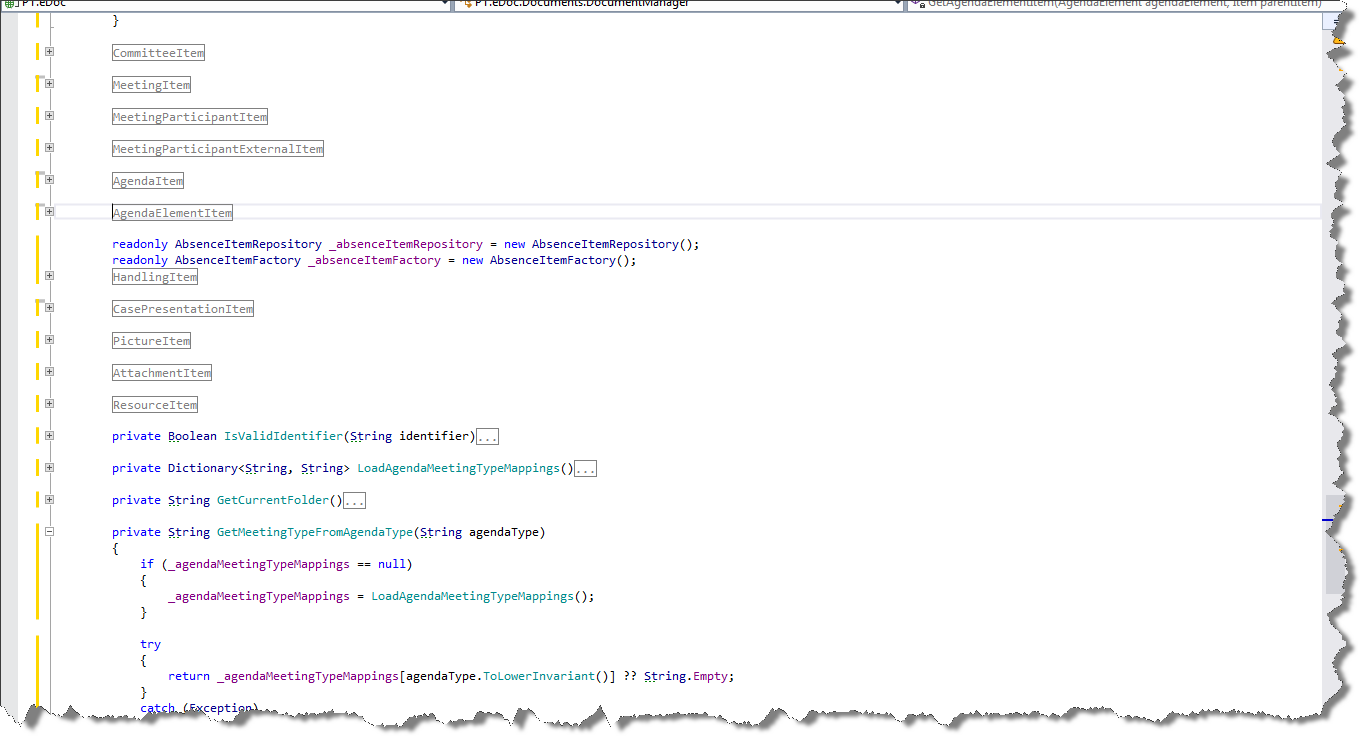
Whilst reviewing a solution I came across the class in the image below, and felt the need for a rant about using regions.

Regions C#

If you need regions, you should consider if the class has more than one RESPONSIBILITY and or is too big! In this case it is responsible for everything and over 1800 lines of code:-(

So a tip, if you need to use the #REGION’s in your code. I would advise you take a few moments and ensure that the class does not have mixed responsibilities. If it does have more than one responsibility you should split it up into a number of smaller classes with a clearly defined responsibility.

I re-factored the class into the following classes:

  • 4 Service classes
  • 13 Factories
  • 13 Repositories
  • 13 Model classes.

In fact by the time I had removed all the code from the class I found that it was not required at all 🙂

Sitecore 7.5 SQL Provider (WFFM 2.5) – Download for specific data range

Version 1.4 is now released and is available either as a sitecore package at sitecore marketplace or you can get the source from Github (for more details see the original post for the module)

Firstly I have to say thanks to Paul Martin (@sitecorepm) as he implemented these new features.

It is now possible to specify a date range for exporting the SQL entries (see image).

date range

The following setting  defines the delimiter to be used to separate the columns in the CSV file.
      <setting name=”WFFM.SQLServer.SaveToDatabase.CsvDelimiter” value=”;” />


The following setting  defines the delimiter to be used to separate the columns in the CSV file.
      <setting name=”WFFM.SQLServer.SaveToDatabase.CsvDelimiter” value=”;” />


Sitecore 7 – Disable indexing – It is not enough to set Indexing.UpdateInterval to 00:00:00.

I was working on a setup for a customer where they have a dedicated publish server and therefore it was not necessary to update the indexes. There are many post stating that to disable sitecore indexing you have to set the Indexing.UpdateInterval setting to 00:00:00 i.e.

<setting name="Indexing.UpdateInterval" value="00:00:00"/>

The website has been recently upgraded from 6.6 to 7.5 and I noticed that the indexes were still being built?

So I used Brian’s jobs page (see his blog) which listed all the running jobs to see what was running and to my shock there were a lot of index update jobs? Which meant that instead of using all the machines power to publish it was busy indexing ALL the time?

running jobs

But since Sitecore 7.0 there is an extra setting which has to be changed in order to disable indexing.

Solution

To disable indexing the BucketConfiguration.ItemBucketsEnabled setting also must be set to false in the Sitecore.Buckets.config i.e.

<setting name="BucketConfiguration.ItemBucketsEnabled" value="false"/>

Hope this helps 🙂

Sitecore Upload Media Dialog Hangs (System.UnauthorizedAccessException)

I have a customer that was experiencing that for some users the SPEAK upload dialog would hang (well was not finished after 30 minutes). It would appear that the image had been uploaded (see below) but it never finished.

Media Upload dialog hangs

After some investigation I found that the users did not have access (create, write or delete) to the media root folder, but the strange thing is that the item was created, but the blob field was empty?

item created in the root

With a lot editors around the world soon the root folder was full of items without images, when I checked the log I could see that in fact a System.UnauthorizedAccessException was being cast (see complete exception below) but not because the item could not be created, but because it was not possible to write to the item?

The user did not have the create permission, so why was the item created? And why does the upload dialog not warn about the user they can not create and or write to an item? so I reported this to Sitecore and they have registered it as a bug and the following hot fix is available:

Sitecore CMS 7.5 rev. 141003 Hotfix 431794-1

If you don’t want to install a support DLL and JavaScript an alternative workaround is to  switch to the non-SPEAK version of the Select Media dialog by performing the following steps:

  1. Edit the /App_Config/Include/Sitecore.Speak.Applications.config file;
  2. Comment out the following lines:
   <overrideXmlControls>
      <override xmlControl="Sitecore.Shell.Applications.Media.MediaBrowser" with="/sitecore/client/applications/Dialogs/SelectMediaDialog" />
   </overrideXmlControls>

Complete Exception

Exception: System.Web.HttpUnhandledException
Message: An unhandled exception occurred.
Source: Sitecore.Mvc
   at Sitecore.Mvc.Pipelines.MvcEvents.Exception.ShowAspNetErrorMessage.ShowErrorMessage(ExceptionContext exceptionContext, ExceptionArgs args)
   at Sitecore.Mvc.Pipelines.MvcEvents.Exception.ShowAspNetErrorMessage.Process(ExceptionArgs args)
   at (Object , Object[] )
   at Sitecore.Pipelines.CorePipeline.Run(PipelineArgs args)
   at Sitecore.Mvc.Pipelines.PipelineService.RunPipeline[TArgs](String pipelineName, TArgs args)
   at Sitecore.Mvc.Filters.PipelineBasedRequestFilter.OnException(ExceptionContext exceptionContext)
   at System.Web.Mvc.ControllerActionInvoker.InvokeExceptionFilters(ControllerContext controllerContext, IList`1 filters, Exception exception)
   at System.Web.Mvc.ControllerActionInvoker.InvokeAction(ControllerContext controllerContext, String actionName)
   at Sitecore.Mvc.Controllers.SitecoreActionInvoker.InvokeAction(ControllerContext controllerContext, String actionName)
   at System.Web.Mvc.Controller.<>c__DisplayClass22.<BeginExecuteCore>b__1e()
   at System.Web.Mvc.Async.AsyncResultWrapper.<.cctor>b__0(IAsyncResult asyncResult, Action action)
   at System.Web.Mvc.Controller.EndExecuteCore(IAsyncResult asyncResult)
   at System.Web.Mvc.Async.AsyncResultWrapper.WrappedAsyncVoid`1.CallEndDelegate(IAsyncResult asyncResult)
   at System.Web.Mvc.Controller.EndExecute(IAsyncResult asyncResult)
   at System.Web.Mvc.MvcHandler.<BeginProcessRequest>b__5(IAsyncResult asyncResult, ProcessRequestState innerState)
   at System.Web.Mvc.Async.AsyncResultWrapper.WrappedAsyncVoid`1.CallEndDelegate(IAsyncResult asyncResult)
   at Sitecore.Mvc.Routing.RouteHttpHandler.EndProcessRequest(IAsyncResult result)
   at System.Web.HttpApplication.CallHandlerExecutionStep.System.Web.HttpApplication.IExecutionStep.Execute()
   at System.Web.HttpApplication.ExecuteStep(IExecutionStep step, Boolean& completedSynchronously)
Nested Exception
Exception: System.UnauthorizedAccessException
Message: The current user does not have write access to this item. User: XXX\yyy, Item: Desert ({B1793B35-A61D-40AC-869F-4AD66A752234})
Source: Sitecore.Kernel
   at Sitecore.Data.Items.ItemEditing.BeginEdit()
   at Sitecore.Resources.Media.MediaData.SetBlobStream(MediaStream mediaStream)
   at Sitecore.Resources.Media.Media.SetStream(MediaStream mediaStream)
   at Sitecore.Resources.Media.MediaCreator.AttachStreamToMediaItem(Stream stream, String itemPath, String fileName, MediaCreatorOptions options)
   at Sitecore.Resources.Media.MediaCreator.CreateFromStream(Stream stream, String filePath, MediaCreatorOptions options)
   at Sitecore.Controllers.MediaController.Upload(String database, String destinationUrl)
   at lambda_method(Closure , ControllerBase , Object[] )
   at System.Web.Mvc.ReflectedActionDescriptor.Execute(ControllerContext controllerContext, IDictionary`2 parameters)
   at System.Web.Mvc.ControllerActionInvoker.InvokeActionMethod(ControllerContext controllerContext, ActionDescriptor actionDescriptor, IDictionary`2 parameters)
   at System.Web.Mvc.ControllerActionInvoker.<>c__DisplayClass15.<InvokeActionMethodWithFilters>b__12()
   at System.Web.Mvc.ControllerActionInvoker.InvokeActionMethodFilter(IActionFilter filter, ActionExecutingContext preContext, Func`1 continuation)
   at System.Web.Mvc.ControllerActionInvoker.InvokeActionMethodFilter(IActionFilter filter, ActionExecutingContext preContext, Func`1 continuation)
   at System.Web.Mvc.ControllerActionInvoker.InvokeActionMethodWithFilters(ControllerContext controllerContext, IList`1 filters, ActionDescriptor actionDescriptor, IDictionary`2 parameters)
   at System.Web.Mvc.ControllerActionInvoker.InvokeAction(ControllerContext controllerContext, String actionName)

Missing dialog’s after upgrading to Sitecore 7.5

After upgrading to Sitecore 7.5 there where a number of SPEAK dialog’s (select media dialog, insert item link, etc) that would open and show the front page of the website?

I eventually tracked it down to they fact that their where a number of duplicated SPEAK items in the core database see the image below and the fact that the solution had some custom code which showed the front page if an item has no renderings defined (not a good idea).

items


I believe that whist upgrading a update package failed and or did not remove the unused items.

Solution

Delete all the items that have the folder icon, and then all the dialog should work again, of course take a backup of the items before deleting them.

Result of the Danish Sitecore Developer Group survey

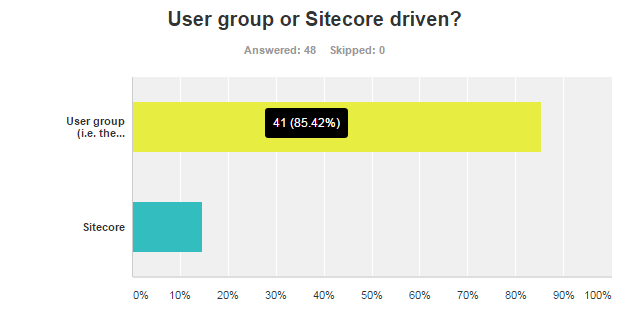
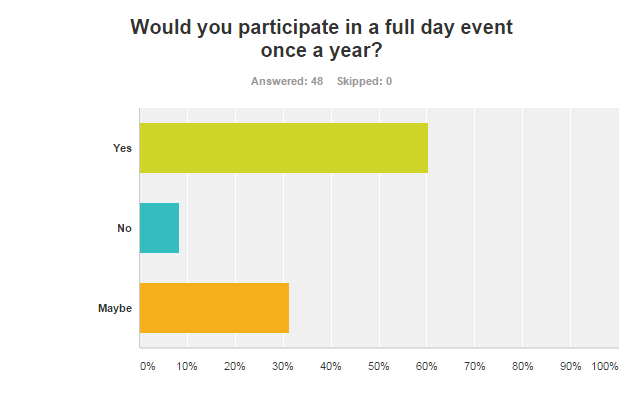
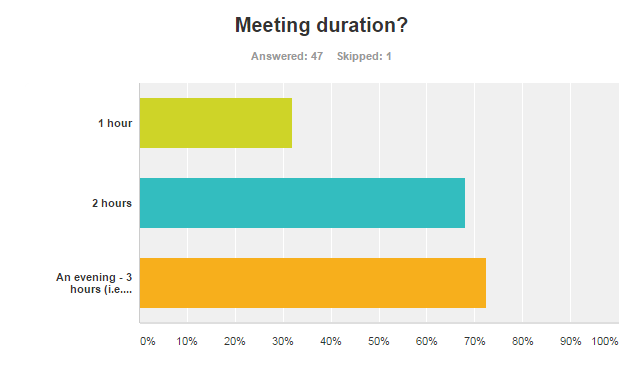
The survey is now closed and here are the results:

q9 q7Danish Sitecore Developer Groupq6 q5 q4 q3 q2 q1


Free text comments received:

  1. I liked the way that DSDG has been untill now
  2. thank you 🙂
  3. Great questions
  4. I think meetup could be extended to other .NET CMS systems and related technologies. Why not grouping with Umbraco, EpiServer etc. to broaden our knowledge.
  5. great to have a SC community like DSDG
  6. Good to see that the group is thriving. It’s a struggle to get things up and running here in au – keep the community-run group.
  7. If anything, clearer expectations of meeting content would be really nice. It would allow me to better decide whether to go or not – especially if the meeting frequency would go up (which I’d prefer). So for example, if someone was really into a particular subject, then they could get together and I would know better up front what the subject was really about
  8. Only been to 1 meeting, but it was a very positive thing and like to come to more

How to add a button to the sitecore content editor to download data as a CSV file

In this blog I will explain how to add a button to the content editor and download data as an CSV file. For this example I will assume that we want to download the data for a given web form for marketers form as a CSV file.

Adding the button
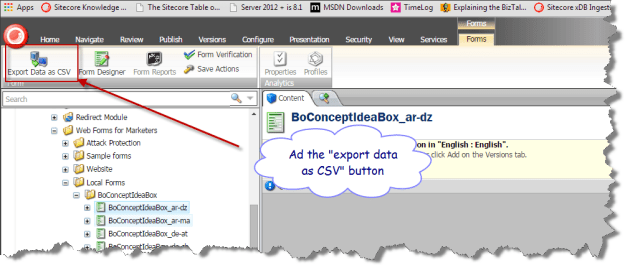
the button

Contextual Ribbons

You may not have noticed but this is a contextual ribbon that is it is only shown when the item is based on the forms template, as it gives no meaning to have the download data as CSV added to all items.

First you need to swap to the core database, and navigate to the Contextual Ribbons item for the content editor i.e. /sitecore/content/Applications/Content Editor/Ribbons/Contextual Ribbons.

This is where all the ribbons that are only shown for specific item types are placed; within this folder there is a forms toolbar, which contains a form strip, which contains a forms chunk, which in turn contains the “Export Data as CSV” button item.

button item
The most important part of the button item is the click field, which defines the command name that will be raised when the button is clicked (I will explain how to hook this up in more detail later).

But how is a contextual ribbon associated with a given template – well that part is easy on the template item under the appearance section there is a ribbon field which can define a contextual ribbon or toolbar to be shown.
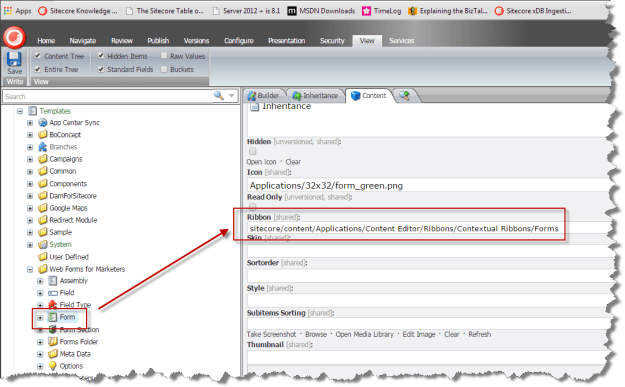
co0ntextual form

How to hook the button click up to the code that is to executed? 

We have to add a command item to the /app_config/commands.config file to bind the command name to the class that is going to provide the functionality.

<command name="forms:exportformdata" type="WFFM.SQLServer.SaveToDatabase.Infrastructure.Commands.ExportFormDataCommand, WFFM.SQLServer.SaveToDatabase" />

The class must inherit from the Sitecore Command class, and override the Execute function.

    internal class ExportFormDataCommand : Command
    {
        public override void Execute(CommandContext context)
        {
            Assert.ArgumentNotNull(context, "context");
            Assert.IsNotNull(context.Items, "context items are null");
            Assert.IsTrue(context.Items.Length > 0, "context items length is 0");

            Item contextItem = context.Items[0];
            Assert.IsNotNull(contextItem, "First context item is null");
            OpenNewWindow(contextItem.ID, contextItem.Name);
        }

        private void OpenNewWindow(ID id, string name)
        {
            Assert.ArgumentNotNull(id, "id");
            UrlString url = new UrlString(Constants.Url.ExportFromDataPage);
            url.Append(Constants.QueryString.Name.ItemId, HttpContext.Current.Server.UrlEncode(id.ToString()));
            url.Append(Constants.QueryString.Name.ItemName, HttpContext.Current.Server.UrlEncode(name));
            SheerResponse.Eval(string.Format("window.open('{0}');", url));
        }
    }

Its not very elegant, but the code generates a URL which points to a aspx page that will stream the data. The Eval method of the sheer response, allows me to execute JavaScript on the client which in this case opens a tab/window.

The aspx page doesn’t do that much it just sets the ContentType to “text/csv” and streams the data. If you want to see the complete implementation, you can download it from github

Hope this was helpful, Alan

Sitecore 7.5 SQL Provider (WFFM 2.5) – Added a button to download data as CSV

As promised I have added the ability to download the form data as an Excel spreadsheet (CSV) .

I have created an include file /app_config/WFFM.SQLServer.SaveToDatabase.config to bind the command to the class that exports the CSV.

<command name="forms:exportformdata" type="WFFM.SQLServer.SaveToDatabase.Infrastructure.Commands.ExportFormDataCommand, WFFM.SQLServer.SaveToDatabase" />

Open the content editor navigate to any form, select the “Forms” tab, and click on the “Export Data as CSV” (see below).

For more information about the module please refer to original blog post, or get the sitecore package from sitecore marketplace  or the source code from GitHub for the source.

CSV button

System.Web.HttpException: Request timed out. – Installing Sitecore CMS 7.1 rev. 130926 Update Package

Whilst upgrading a solution from 7.0 to 7.1 in pre-production I got the following timeout exception.

timeout error


Of course the first thing I did was set the timeout value of the httpRuntime to a massive number in the hope that this would fix the issue., but it didn’t 😦

<httpRuntime maxRequestLength="512000" executionTimeout="6000000" enableKernelOutputCache="false" />

The problem is with IIS application pool setting “Ping Maximum Response Time” which is the time in seconds the worker process is given to respond to health monitoring ping. After 5 missed responses the work process is timed out and causes the afore mentioned exception

There are 2 solutions:

  1. Set ping enabled to false
  2. Set the Ping Maximum Response Time (seconds) to a large value

ping disabled

Of course remember to reset these values after you have upgraded.

I have to give the credit and say thanks to Marina from Sitecore support, as Marina identified this issue 🙂