Tag Archives: Sitecore

Sitecore Commerce 8 powered by Microsoft Dynamics (SCpbMD) – Find the channel ID

Sitecore expects an integer value to identify the channel id, which is used to identify the online store to retrieve from the channel database.

The problem I faced was that the neither the Microsoft Ax Partner or the customer could give me the id, all they could find was the name which was a string value!

But fear not the following SQL statement which you can run against the channel database will show you all the channels and their assoicated id 🙂

SELECT TOP 1000 [NAME]
      ,[CHANNELID]
      ,[OPERATINGUNITNUMBER]
      ,[SERVER]
      ,[DATABASE]
      ,[ISPUBLISHED]
      ,[ISLOCAL]
      ,[CONNECTIONSTRING]
  FROM [AsyncClientDB].[crt].[STORAGELOOKUPVIEW]

Also ensure that channel is in fact published otherwise Sitecore can not use it, hope this helps Alan

channel id

How to suspend sitecore schedule publishing – aborting the publish pipeline is not enough, it requires an exception!

The customer wanted the ability to suspend scheduled publishing, but could still make manual publishes (i.e. started from the Sitecore client).

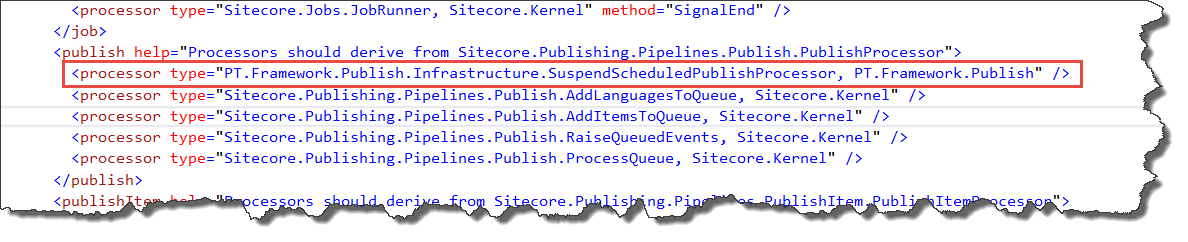
Each time a publish is started it runs the publish pipeline. Therefore it is possible to insert a custom pipeline step at the beginning (see below) to do the following:

  1. Identify if it was a scheduled publish
  2. Check if a check-box in Sitecore is ticked
  3. If both conditions are met – abort the publish pipeline to stop the publish

publish pipeline

Unfortunately aborting the publish pipeline is not enough 😦

In the initial code I would abort the pipeline using AbortPipeline() (see below) as I assumed this was enough to stop the publish. The pipeline was aborted and no items were published, but the code that starts the pipeline still updated the properties table indicating that the publish had succeeded:-(

code

Side affect

This had the side effect that when the schedule publishing was enabled again, any items that were modified or created whist the publishing was disabled would not be published as when scheduled publishing was resumed Sitecore believed that they had already been published.

Solution

After checking the code using reflector I determined if I threw an exception, it would ensure that the properties table was not updated. So the publish was completely cancelled, and when scheduled incremental publishing was resumed it will publish all the items that have been modified since the last successful publish, and not since the last aborted publish.

How to identify a scheduled publish

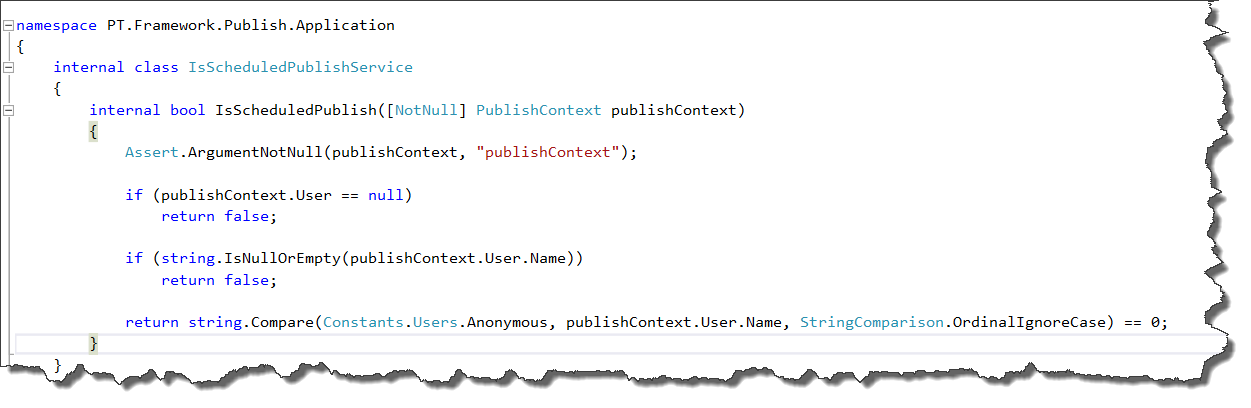
Not the nicest solution but it works! I check the publish context user which can have the following values:

  1. The user logged into sitecore – If publish is started from the Sitecore client
  2. sitecore\Anonymous – if the publish is started by the scheduler

If the value is sitecore\Anonymous I know that it is a scheduled publish.

is schedules


How to filter AD roles or users using Sitecore’s LDAP module

Problem
Every time I have used AD for providing access to Sitecore, the active directory (AD) structure is crazy and recently I had a customer that had over 18000 roles, which made it difficult to assign roles and it killed the performance of the Sitecore client, as each user had at least 500 roles. Therefore Sitecore to evaluate the combination of a lot of roles to determine if they had read access or not.
18000I talked to the department responsible for the AD setup about changing and or creating a folder that only contained the Sitecore related roles, but this was not possible.

Initially I thought I would have to make own LDAP provider which derives from the standard provider, but I discovered this was not necessary as the LDAP module provides the functionality as standard.

Custom Filters
Custom Filter provide the ability to filter the roles and or users returned from the AD (see section 4.1 for full documentation).The custom filter uses the standard LDAP query syntax (see MSDN) to specify how the user or roles are filtered.

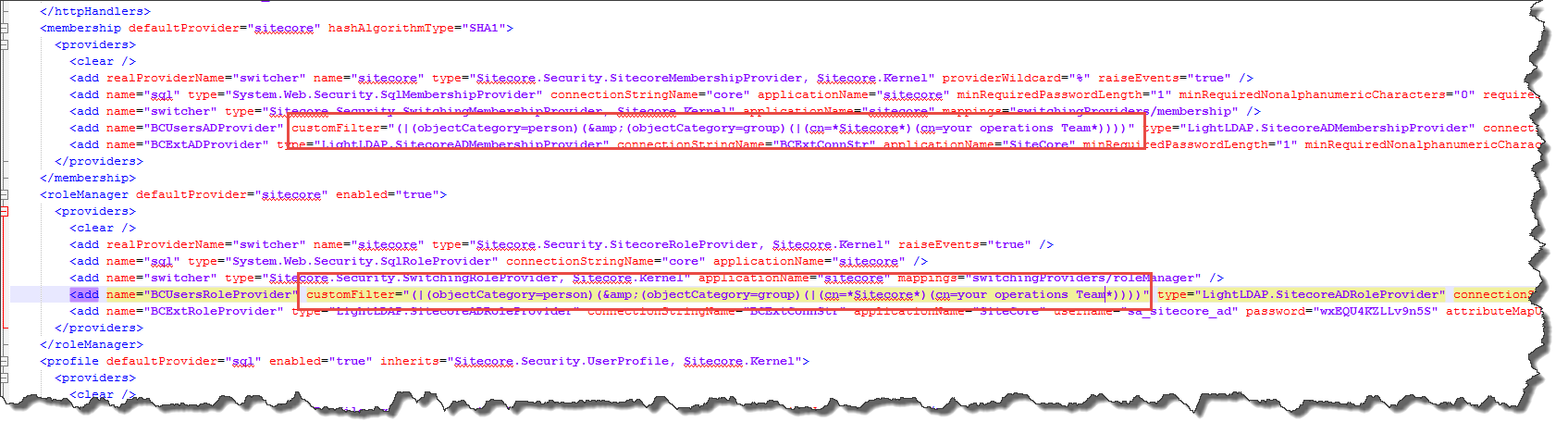
The following example ensures only roles, which contain Sitecore and or the special operations role; are imported into Sitecore. The Customcustom Filter

According to Sitecore documentation, both the User and Role provider must have the same CustomFilter, and that is why the (objectCategory=person) is added so all users are also imported regardless of their name.

I hope this blog post will help others using LDAP to control what roles or users are shown within sitecore.

Sitecore SPEAK Insert Link Dialog – missing icons & sitecore tree – Don’t panic, U didn’t break it!!!!

I was upgrading a solution from 6.2 to 7.2 and it had a number of custom fields that no longer worked,  so I started to fix the code.

One of the custom fields showed the SPEAK  Insert link dialog and after making a lot of changes, I noticed that I had broken the SPEAK dialog, see below

Speak dialog....

I reviewed the changes I had made, and could not see what could have caused this issue? But to be on the safe side, I undid all of my changes, did a full build, etc and still I had the issue 😦

So I tried to open the dialog from a sitecore standard field, and it was also broken 😦

Solution

Whist starting to panic, after 5 minutes I noticed that the dialog had fixed itself!!!!

It appears that after a restart of the website the first time you open the “Insert link” dialog you have to wait 5 minutes for it to start working, after that it works straight away.


Sitecore 7 – Disable indexing – It is not enough to set Indexing.UpdateInterval to 00:00:00.

I was working on a setup for a customer where they have a dedicated publish server and therefore it was not necessary to update the indexes. There are many post stating that to disable sitecore indexing you have to set the Indexing.UpdateInterval setting to 00:00:00 i.e.

<setting name="Indexing.UpdateInterval" value="00:00:00"/>

The website has been recently upgraded from 6.6 to 7.5 and I noticed that the indexes were still being built?

So I used Brian’s jobs page (see his blog) which listed all the running jobs to see what was running and to my shock there were a lot of index update jobs? Which meant that instead of using all the machines power to publish it was busy indexing ALL the time?

running jobs

But since Sitecore 7.0 there is an extra setting which has to be changed in order to disable indexing.

Solution

To disable indexing the BucketConfiguration.ItemBucketsEnabled setting also must be set to false in the Sitecore.Buckets.config i.e.

<setting name="BucketConfiguration.ItemBucketsEnabled" value="false"/>

Hope this helps 🙂

Missing dialog’s after upgrading to Sitecore 7.5

After upgrading to Sitecore 7.5 there where a number of SPEAK dialog’s (select media dialog, insert item link, etc) that would open and show the front page of the website?

I eventually tracked it down to they fact that their where a number of duplicated SPEAK items in the core database see the image below and the fact that the solution had some custom code which showed the front page if an item has no renderings defined (not a good idea).

items


I believe that whist upgrading a update package failed and or did not remove the unused items.

Solution

Delete all the items that have the folder icon, and then all the dialog should work again, of course take a backup of the items before deleting them.

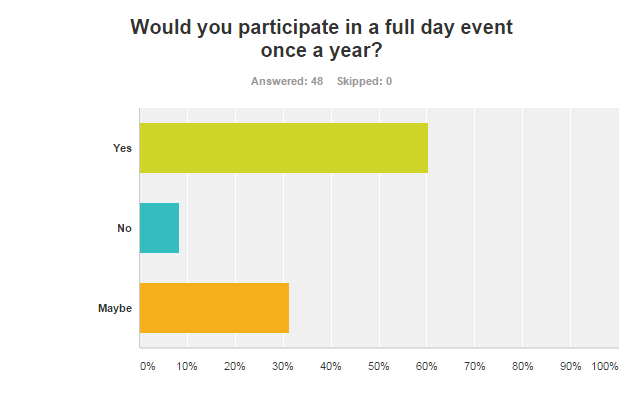
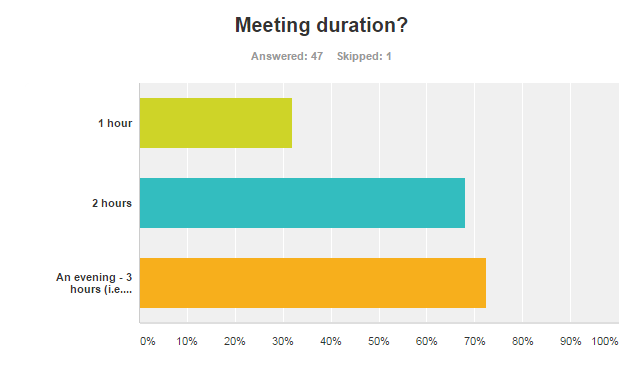
Result of the Danish Sitecore Developer Group survey

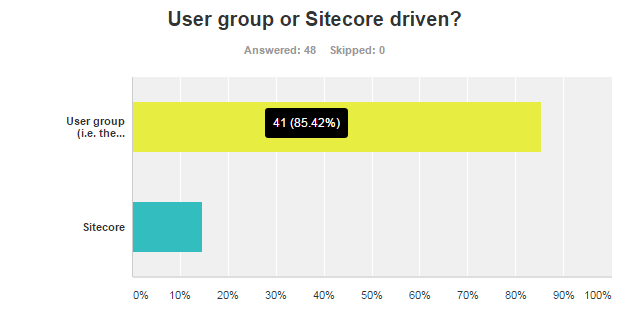
The survey is now closed and here are the results:

q9 q7Danish Sitecore Developer Groupq6 q5 q4 q3 q2 q1


Free text comments received:

  1. I liked the way that DSDG has been untill now
  2. thank you 🙂
  3. Great questions
  4. I think meetup could be extended to other .NET CMS systems and related technologies. Why not grouping with Umbraco, EpiServer etc. to broaden our knowledge.
  5. great to have a SC community like DSDG
  6. Good to see that the group is thriving. It’s a struggle to get things up and running here in au – keep the community-run group.
  7. If anything, clearer expectations of meeting content would be really nice. It would allow me to better decide whether to go or not – especially if the meeting frequency would go up (which I’d prefer). So for example, if someone was really into a particular subject, then they could get together and I would know better up front what the subject was really about
  8. Only been to 1 meeting, but it was a very positive thing and like to come to more

How to add a button to the sitecore content editor to download data as a CSV file

In this blog I will explain how to add a button to the content editor and download data as an CSV file. For this example I will assume that we want to download the data for a given web form for marketers form as a CSV file.

Adding the button
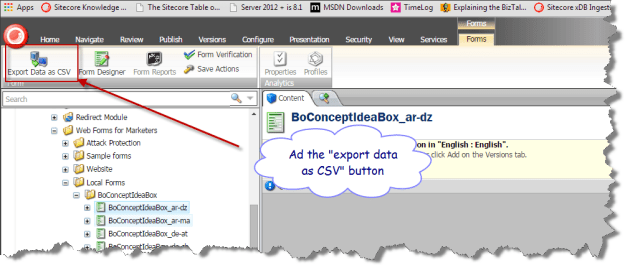
the button

Contextual Ribbons

You may not have noticed but this is a contextual ribbon that is it is only shown when the item is based on the forms template, as it gives no meaning to have the download data as CSV added to all items.

First you need to swap to the core database, and navigate to the Contextual Ribbons item for the content editor i.e. /sitecore/content/Applications/Content Editor/Ribbons/Contextual Ribbons.

This is where all the ribbons that are only shown for specific item types are placed; within this folder there is a forms toolbar, which contains a form strip, which contains a forms chunk, which in turn contains the “Export Data as CSV” button item.

button item
The most important part of the button item is the click field, which defines the command name that will be raised when the button is clicked (I will explain how to hook this up in more detail later).

But how is a contextual ribbon associated with a given template – well that part is easy on the template item under the appearance section there is a ribbon field which can define a contextual ribbon or toolbar to be shown.
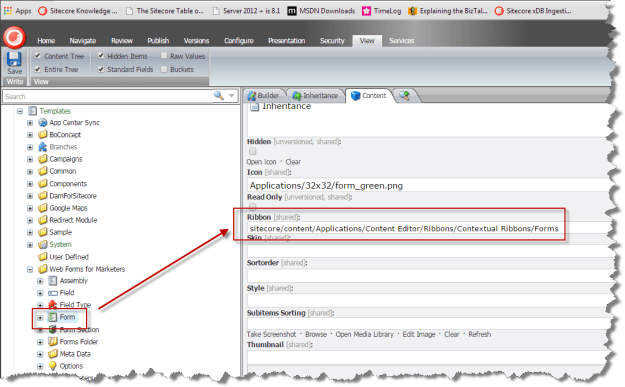
co0ntextual form

How to hook the button click up to the code that is to executed? 

We have to add a command item to the /app_config/commands.config file to bind the command name to the class that is going to provide the functionality.

<command name="forms:exportformdata" type="WFFM.SQLServer.SaveToDatabase.Infrastructure.Commands.ExportFormDataCommand, WFFM.SQLServer.SaveToDatabase" />

The class must inherit from the Sitecore Command class, and override the Execute function.

    internal class ExportFormDataCommand : Command
    {
        public override void Execute(CommandContext context)
        {
            Assert.ArgumentNotNull(context, "context");
            Assert.IsNotNull(context.Items, "context items are null");
            Assert.IsTrue(context.Items.Length > 0, "context items length is 0");

            Item contextItem = context.Items[0];
            Assert.IsNotNull(contextItem, "First context item is null");
            OpenNewWindow(contextItem.ID, contextItem.Name);
        }

        private void OpenNewWindow(ID id, string name)
        {
            Assert.ArgumentNotNull(id, "id");
            UrlString url = new UrlString(Constants.Url.ExportFromDataPage);
            url.Append(Constants.QueryString.Name.ItemId, HttpContext.Current.Server.UrlEncode(id.ToString()));
            url.Append(Constants.QueryString.Name.ItemName, HttpContext.Current.Server.UrlEncode(name));
            SheerResponse.Eval(string.Format("window.open('{0}');", url));
        }
    }

Its not very elegant, but the code generates a URL which points to a aspx page that will stream the data. The Eval method of the sheer response, allows me to execute JavaScript on the client which in this case opens a tab/window.

The aspx page doesn’t do that much it just sets the ContentType to “text/csv” and streams the data. If you want to see the complete implementation, you can download it from github

Hope this was helpful, Alan

Sitecore 7.5 SQL Provider (WFFM 2.5) – Added a button to download data as CSV

As promised I have added the ability to download the form data as an Excel spreadsheet (CSV) .

I have created an include file /app_config/WFFM.SQLServer.SaveToDatabase.config to bind the command to the class that exports the CSV.

<command name="forms:exportformdata" type="WFFM.SQLServer.SaveToDatabase.Infrastructure.Commands.ExportFormDataCommand, WFFM.SQLServer.SaveToDatabase" />

Open the content editor navigate to any form, select the “Forms” tab, and click on the “Export Data as CSV” (see below).

For more information about the module please refer to original blog post, or get the sitecore package from sitecore marketplace  or the source code from GitHub for the source.

CSV button

Sitecore Fast Query Syntax – Can kill your SQL Server or website

Over the years I have worked on lots of websites that have performance issue caused by sitecore queries that iterate over too many items, usually searching through descendants.

In development where there are not too many items the query performs OK. The site goes live and they start to add content and soon there are 1000’s of items and the queries becomes slower and slower over time. A typical example is searching for the 10 latest news, articles, blog’s etc.

At this point a fix is made by changing the queries to use the “fast:” syntax. There are a lot of articles already explaining this in detail, so this is just a brief intro, the fast syntax translates the query directly into an SQL server database query, and therefore for some queries it can perform faster, use less memory and less CPU.

But a warning it bypasses all caching that sitecore provides and make a request directly to the database every time the query is executed; in development this tends to outperform the standard queries that would have to iterate over a lot of items.

In development you usually test the normal query against the fast syntax query to establish if it is quicker and if it’s quicker you use it and everybody is happy… but that is not the full story.

Let’s assume each page generates 10-20 queries that rely on fast syntax to retrieve their items. Therefore each page request generates 10-20 calls to the SQL database, I’ve seen sites that generate 100’s of SQL request per page 😦

In development this would typically not be an issue and or not noticed, as only one page at a time is requested, but in a production on a website with lots of requests it can kill the SQL database and or slow the site down as sitecore itself cannot retrieve items form the database, as the SQL server is busy with all the fast queries.

Therefore you have to be VERY VERY CAREFUL with the use of fast queries.

I would say in 97% of cases – if your queries slow and it is caused by iterating over to many items the correct solution is to use Sitecore search i.e. lucene, Solr, Coveo or another indexer to retrieve the items.